Users of the iPhone have discovered that the phone has a very comprehensive “Field Test” mode that allows users to find out a range of information about the phone’s connection to the network. In particular, the information displayed in the Field Test mode allows users to discover exactly which tower their phone is connecting to, and which frequency band the signals are being sent on.
Here are some simple instructions to find out which frequency your iPhone is using:
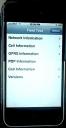
1. Access the iPhone’s Field Test mode by typing *3001#12345#* in the phone’s keypad and press dial. This will bring up the Field Test menu.
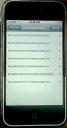
2. Select the “Cell Information” menu option to display a summary of all nearby towers. The “RX” code displays the signal strength of each tower. These RX values are dBm signal strength readings, where lower values means strong signal (so -60 signifies stronger signal than -80). The towers are listed by signal strength, and the top tower is usually the tower your phone is connecting to.
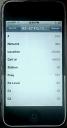
3. Selecting the first tower will take you to a further menu that displays more specific information. The “Freq” value shows the frequency block that the network is using. If the Freq number is between 128 and 251, the tower is using the 850 MHz Cellular band. If the Freq number is between 512 and 810, the tower is using the 1900MHz PCS band.

This entry was posted
on Friday, July 13th, 2007 at 12:24 pm and is filed under AT&T, Cell Frequency, iPhone reception.
You can follow any responses to this entry through the RSS 2.0 feed.
You can leave a response, or trackback from your own site.
May 12th, 2008 at 8:24 pm
what is the actual conversion for the frequency number and the sctual frequency
June 29th, 2008 at 7:39 am
How can we change what tower the phone is using? The strongest signal is at the bottom of the list on my phone.
July 15th, 2008 at 1:12 pm
Does anyone know how to interpret the data using the iPhone software 2.0 field test. There is a lot more information now and I can’t seem to find the frequency numbers. Anyone who is familiar with this cryptic data would be appreciated.
August 5th, 2008 at 11:09 pm
In 2.0 after a little bit of searching, feel as if i have found the equivalent.
1. Enter Field Test Mode
2. Cell Information
3. Neighbour Cells
4. Here you have the list of nearby towers, once again highest strength on top.
I use Rx Level as an indicator of signal strength. Notice upper left hand corner no longer has bars as a signal strength indicator but a number (gasp!) that appears to be indicating overall strength.
Word, no factual evidence to back up my findings but seems to make sense in my mind.
October 18th, 2008 at 4:33 am
I am try how to find a way to change the frequency on my I9 cell fone where you go to in phone menu
December 3rd, 2008 at 11:38 pm
drr – ARFCN stands for Absolute Radio Frequency Channel Number. ARFCN is a radio channel numbering scheme used to identify specific RF channels in a cellular mobile radio system.
Tim – You Can’t change to a different tower. The iphone will pick the strongest cleanest signal as it’s checking these criteria all the time and reporting the info back to the network of your current serving cell.
Chris & Waldo – see my answer to drr. Furthermore, looking at the data in “Serving Cell” the first three fields are in HEX format. There are converters online to calculate the decimal equivilant. The LAC is the “area” code for the geographic area your network is serving. It will change if you move out of the area. The AT&T Mobility Cell Id in decimal is the tower code+the sector. Usually there are 3 sectors A/B/C. The 2nd, 3rd and 4th decimal numbers indicate the tower/cellsite. The last number is usually a 1, 2 or 3 indicating the sector you are connected too. In the upper left hand corner, the 5 bars are replaced with a decimal indicating the power ratio in decibels (dB) of the measured power referenced to one milliwatt. These are measured on the negative side of zero so of course the closer you are towards a positive number, the stronger the ratio is and likewise a better chance of good service. Anything above a -85 is shows as 5 bars. Anything below -105 is zero bars and loss of connection usually occurs. In the “Network Information” the “Serving RX level” is a better indicator of the quality of signal that can be passed and it’s updated more frequently. Higher numbers are better than lower numbers. 70 is way better than a 4.
Mark – You can’t change frequencies. You can turn of enabled bands. But frequencies which are tied to ch numbers are calculated and assigned by the network your on.
February 1st, 2009 at 6:05 am
attbob,
My iPhone shows an ARFCN of 33469. How can I tell what frequency band, 800 or 1900MHz, my iPhone is using from that number?
Thanks
February 26th, 2009 at 12:49 pm
is there anyway of finding out the signal strength of ATT in my zip code?
peter frank
March 18th, 2009 at 8:40 am
[...] Mai multe detalii aici [...]
March 28th, 2009 at 1:51 pm
how do I use my 2.0 software to tell frequency? 800MHZ or different?
June 22nd, 2009 at 9:55 am
Is there a way to connect to t-mobile’s 3g network that is on 1700 MHz and 2100 MHz?
November 4th, 2009 at 11:39 am
Can you make the iPhone transmit short bursts of data (less than a 1 second) in some other frequency like 430MHz or 285MHz?
March 2nd, 2010 at 6:36 pm
JOE, NO – THE IPHONE WORKS ON 850, 900, 1800, 1900 AND 2100 MHZ. TMOBILE 3G IS ON 1700 MHZ ANDY.